
Primo — Incident Management Protocol
Incident Identification and Reporting
- When faced with an issue or a hindrance during the proof checking process, refresh and attempt it once more to ensure that it displays the same result.
- Go through the user manual, tutorials or FAQs to ascertain that you have followed the right steps so far.
- If you encounter any issues with the PRIMO interface, please report them directly to the PRIMO Support Team by emailing [Support Email Address], and ensure to include JM-TS in the CC field. Our dedicated support team is committed to providing prompt assistance and is available from 08:00 IST to 20:00 IST.
- For incidents of normal severity, we aim to resolve issues within a maximum time frame of 24 hours. Please note that around-the-clock support for high-priority (P1 and P2) issues is currently under review and may be implemented in the future.
- Kindly include the kind of issue you faced in short words in the subject line for easy identification.
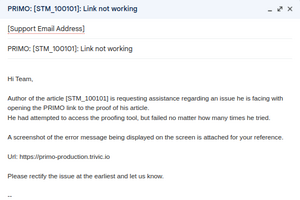
- Syntax: Primo: [JID_AID]: Problem
- Example
- Primo: [ENDEND_1000]: PDF not generated

- Email body should contain:
- URL: The URL of the proof
- Stage: The current stage of the proof (AU, ED or MC)
- Problem: Problem in detail.
- Screenshot: Attach the screenshot of the problem
Incident Type
| Incident Type (1) | Primo-UI Issue | Concern related to Link loading issues, unable to submit, discrepancy in Primo UI for all articles in live. |
|---|---|---|
| Incident Type (2) | Primo-Validation signal | • For all the dropped Primo dataset, if the validation signal is not received from Primo within the expected threshold time of 30 minutes.
• Consistently receiving unclear validation failure from Primo system for all the dropped Dataset. |
| Incident Type (3) | Primo-Out Package | When an AU/ED/MC submits the Primo link and the relevant OUT package is not received in supplier SFTP within the threshold time of 30 minutes for all articles. |
Incident Tracking
The support mails received and resolved by the team can be tracked via:
https://docs.google.com/spreadsheets/d/1zVmnvflb6WnX-aQXJFmZgTqMcA3NhJgt68ufw-B4i4Q/edit#gid=0